Skip to content
On Microsoft Marketplace

Mesh for your organisation

Audit your own Microsoft tenant, connect the systems around it, and operate it from Copilot

Find out what state your tenant is in, read it in one portal, and keep it current. When you are ready, Mesh Pro adds integration for your line-of-business systems and AI tools that work as you, with your permissions.

Are you an MSP? Mesh for MSPs

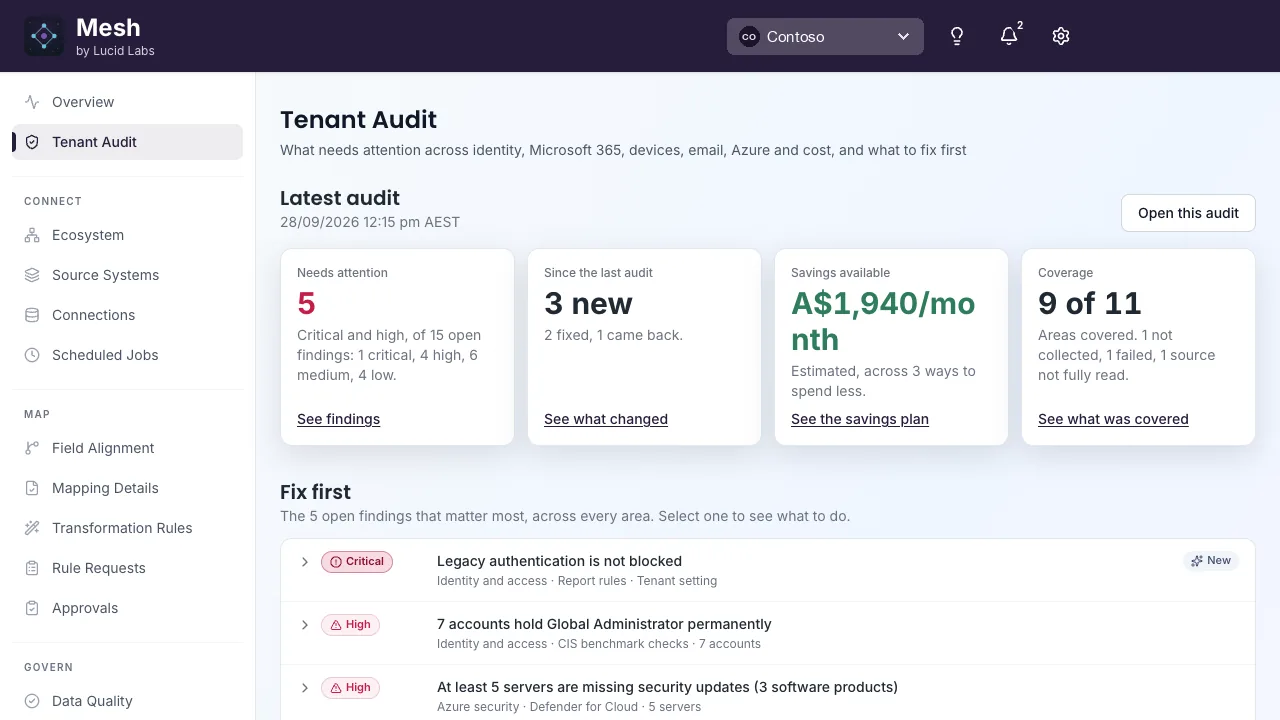
The Mesh Tenant Audit page for a demo tenant. Tiles show 5 findings needing attention, 3 new since the last audit, estimated savings and 9 of 11 areas covered. A Fix first list starts with a critical finding that legacy authentication is not blocked.
Each tenant’s audit opens on the findings that matter most, what changed since the last run, and how much of the tenant was covered.

What you get done

Proof for the board, from your own tenant

Find out where your tenant stands and what your licences already cover. With Mesh Pro, run the day-to-day from Microsoft 365 Copilot or Claude, signed in as you.

Answer “are we safe?” with evidence

Each area of your tenant reported as covered, not collected or failed, so you can tell a gap from a clean result.

Ask: “Are we safe? Show me what the audit could not check.”

Use what your licence already pays for

Before anyone quotes a governance project, see the protections you already own but haven’t switched on, split into no-cost changes and investment decisions.

Ask: “What are we paying for and not using?”

Get ready for Copilot, with proof

Sensitivity labels, DLP and stale guests checked before Copilot reaches your data, with a summary you can take to the board.

Ask: “Are we ready for Copilot? Give me the board summary.”

Catch up on Teams and mail in one go

Unread threads, unanswered chats and what changed while you were out, summarised from Microsoft 365.

Ask: “What did I miss in Teams since Friday?”

See what is overdue, everywhere

Tasks across every Planner plan you can see, with owners and due dates.

Ask: “What is overdue across all my plans?”

Get a bid response started

Draft RFI and tender answers from your own past responses, then export to Word or PDF.

Ask: “Draft our response to this RFI from past bids.”

What Mesh does

Audit, integrate and operate, on one platform

Running a tenant well takes the same jobs every time: find out what state it is in, keep that picture current, connect it to the systems the business runs on, and do the operational work. Mesh puts them behind one sign-in and one set of permissions.

Tenant audit

Find out what state your Microsoft tenant is in, then keep that picture current.

  • Thirteen areas, from identity and email to licensing, Azure cost and Power Platform
  • Each area marked covered, not collected or failed
  • Baselined, so the next run measures drift
  • Consent to the app and start it from the portal: nothing to install

Integration

Connect the systems your business runs on, with mapping rules the process owner can read. In Mesh Pro.

  • Onboard systems from their OpenAPI or REST definitions
  • Proposed field mappings with a confidence score, approved by a person
  • Bidirectional sync with retries, notifications and schema change detection
  • Credentials in Azure Key Vault, and every run retained

MCP tools and Lucy for Mesh

Do the operational work from Microsoft 365 Copilot or Claude, without giving an AI more access than you hold. In Mesh Pro.

  • Over 950 tools across 56 domains, from mail, Teams and SharePoint to CRM
  • Timesheets, documents, invoicing, bid responses and OCR
  • Lucy for Mesh, the Microsoft 365 Copilot agent, for multi-step work
  • Delegated only: every action runs as you, within your rights

The 13 areas the audit reads

Entra security
Users, groups, privileged roles, Conditional Access, authentication methods, cross-tenant access and audit logs, plus the Maester baseline tests.
Microsoft 365 configuration
App registrations and consent grants, SharePoint settings and oversharing, Intune policies and devices, Microsoft Places and Defender alerts.
Microsoft 365 adoption
Active users, mailbox, OneDrive and SharePoint storage, and Teams and email activity over 30 and 90 days.
Email security
Anti-phishing, outbound spam, Safe Links, Safe Attachments, transport rules, connectors, domains and mailbox forwarding.
Data protection
Microsoft Purview data loss prevention policies and the locations they enforce on, including Microsoft 365 Copilot, plus sensitivity labels, label publishing, default and mandatory labelling, and auto-labelling.
Agents
The Copilot agent estate from the Agent 365 catalogue: unmanaged and tenant-wide agents, pending agent requests and blocked agents still deployed, plus Conditional Access coverage of agent identities, open agent risk detections and whether DLP and Insider Risk policies reach agents.
Licensing
Subscribed SKUs, licences bought against licences assigned, per-user assignments and what can be reclaimed.
Azure resources
Subscriptions and their resources: virtual machines, networks, storage accounts, key vaults, SQL and App Service.
Azure security
Defender for Cloud plans and secure score, policy compliance, CIS and Azure hardening checks, and Azure role assignments.
Azure Cost Management
Spend by service and resource group, marketplace spend, budgets, reservations, Advisor cost recommendations and the cost-optimisation analysis.
Governance
Access reviews and access packages, tag compliance and Cloud Adoption Framework alignment.
Fabric and Power BI
Workspaces, capacities, semantic models, reports, tenant settings and publish-to-web exposure.
Power Platform
Who administers Power Platform and Dynamics 365, who holds their licences, service principals, Copilot Studio agent identities and consents.

Most areas need only the audit app’s consent. The Azure areas also need read roles on your subscriptions: Reader, Security Reader, Monitoring Reader and Cost Management Reader. Email needs an Exchange permission and the View-Only Organization Management role group, and access reviews need Microsoft Entra ID P2 or ID Governance. An area the audit could not read is marked not collected.

The MCP tools: Over 950 tools across 56 domains, in Mesh Pro

Every tool acts as the person signed in, from Microsoft 365 Copilot through Lucy for Mesh, or from Claude, VS Code or any MCP client. Tools that delete or overwrite need that person’s confirmation before they run.

Microsoft 365 work
Mail, calendar, contacts, Teams, SharePoint, OneDrive, Planner, Excel, Word, Lists, Bookings and Microsoft Places
CRM and Dataverse
Customers, leads, opportunities, quotes and cases in Dynamics 365, and Dataverse
Time and projects
Timesheets, work activities, projects and action items
Documents and bids
Document and PowerPoint generation, Document Intelligence OCR, invoicing, and bid and RFI responses
Your own audit
Start a tenant audit, check its progress and read the results from chat

Inside the portal

What you see

Screens from the Mesh portal, on a demo tenant.
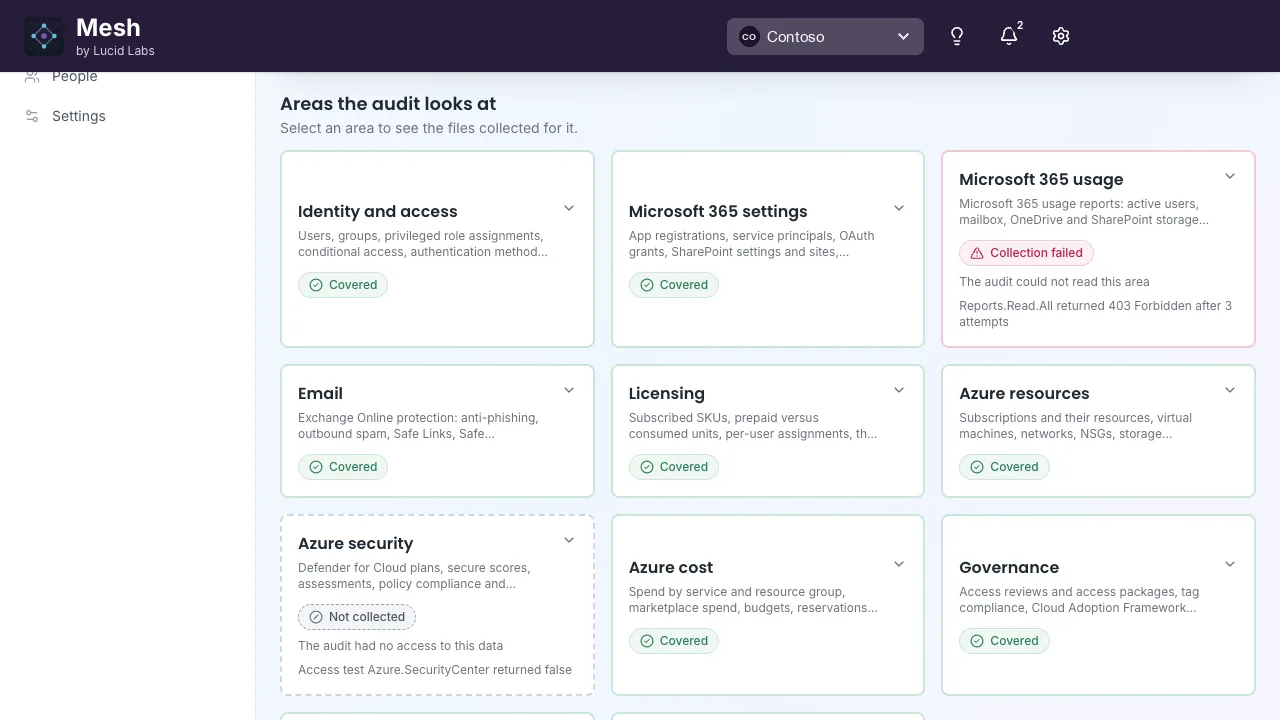
  1. The Mesh page Areas the audit looks at. Cards for identity and access, Microsoft 365 settings, email, licensing, Azure resources, Azure cost and governance are marked Covered. Microsoft 365 usage is marked Collection failed with a 403 error, and Azure security is marked Not collected because the audit had no access.

    Covered, not collected or failed

    Every area the audit looks at says whether it was read. A gap shows as a gap, with the reason.
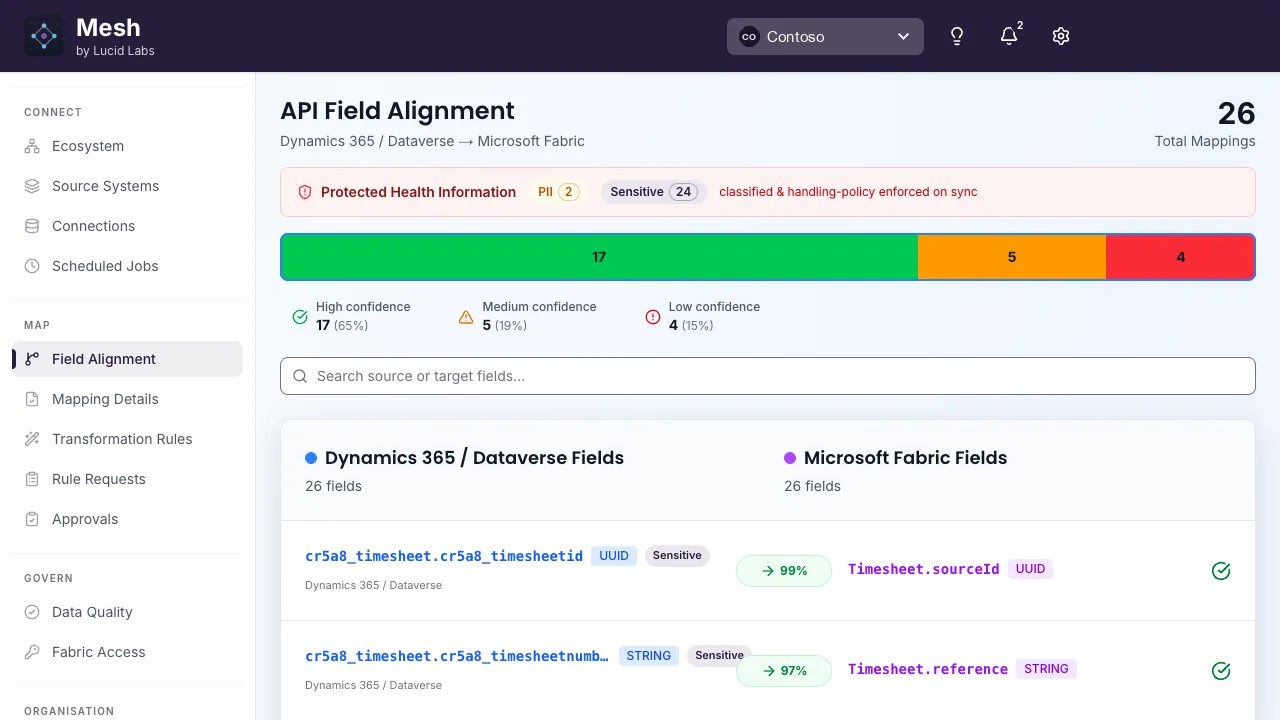
  2. The Mesh API Field Alignment page mapping Dynamics 365 Dataverse fields to Microsoft Fabric fields. A bar shows 17 high, 5 medium and 4 low confidence mappings, and each field pair shows its match confidence, such as 99 percent.

    Mappings you approve

    The integration service proposes field mappings between two systems with a confidence score. You approve, adjust or override each one.

Plans

Plans compared

Three plans for an organisation running its own tenant. Each covers your own tenant only.

What each Mesh plan includes for your own tenant
FeatureMesh FreeGiven to you by your MSP or Lucid LabsMeshAudit your own tenantMesh ProAudit, integrate and operate
The Mesh portal for your own tenantRead-onlyIncludedIncluded
Audit results, by areaIncludedIncludedIncluded
Run audits yourselfNot includedIncludedIncluded
Baselined results that measure driftIncludedIncludedIncluded
Integration service (iPaaS)Not includedNot includedIncluded
MCP tools for Copilot, Claude and other clientsNot includedNot includedIncluded
Lucy for MeshNot includedNot includedIncluded
How you get itIssued to youMarketplaceMarketplace
Buy on Microsoft MarketplaceGet itBuyBuy
  1. Choose your plan

    Mesh to audit your own tenant, or Mesh Pro to add integration and AI tools. Compare them in the table above.

  2. Select Buy

    The Azure portal opens on that plan. It bills monthly on your existing Microsoft invoice.

  3. Configure your account

    Select Configure account when Microsoft asks. You land in Mesh, sign in with your work account and the subscription goes live. No administrator is needed for this step.

Prices and terms for every plan are on the Mesh listing on Microsoft Marketplace.

Mesh Free

Your MSP or Lucid Labs gives you a Free seat

If an MSP looks after your tenant, or you are a direct customer of Lucid Labs, you may not need to buy anything to start. They run the audit and give you a Free seat to read the results.

  • Your MSP, or Lucid Labs if you are our direct customer, runs the audit on your tenant and gives you a Free seat
  • You read the results in the Mesh portal, for your own tenant only
  • There is no charge. If you add it yourself on Microsoft Marketplace, Lucid Labs matches your tenant to your MSP
  • When you want to run audits yourself, or add integration and AI tools, move to Mesh or Mesh Pro
The Mesh page Areas the audit looks at. Cards for identity and access, Microsoft 365 settings, email, licensing, Azure resources, Azure cost and governance are marked Covered. Microsoft 365 usage is marked Collection failed with a 403 error, and Azure security is marked Not collected because the audit had no access.
On a Free seat you read your own results, area by area.

How it works

Where Mesh runs, and how it reaches your tenant

Mesh is multitenant SaaS in Lucid Labs’ own Azure subscription. Nothing runs in your tenant: Mesh reaches it only through the Entra apps you consent to.

Your tenants

  • People sign in with Microsoft Entra ID
  • The Mesh portal in the browser
  • Lucy for Mesh in Microsoft 365 Copilot and Teams
  • Claude, VS Code and other MCP clients

Mesh, in Azure Australia East

  • Azure Front Door and WAF in front of every entry point
  • The Mesh portal and integration service
  • The Hub and MCP server: tenants, plans and the MCP tools
  • The audit runner: one Container Apps job per audit, signing in by federated credential
  • Cosmos DB, Storage and Key Vault, reached by managed identity

Microsoft services

  • Microsoft Marketplace: subscription and usage
  • Partner Center: GDAP relationships
  • Microsoft Graph, Dataverse and Azure Resource Manager
How Mesh fits together.
  1. Users sign in with Entra ID. The portal, Lucy and MCP clients all come in through Front Door.
  2. MCP tools act on a tenant with an on-behalf-of token, so Graph and Dataverse enforce the user’s own rights.
  3. An audit runs as a queued job that reads the tenant read-only through Microsoft Graph and Azure Resource Manager.
  4. Results land in Mesh, shown per tenant. An MSP sees each client it manages under GDAP.

Security and data residency

Who can reach what, and how

The questions a compliance reviewer asks first, answered on the page.

The tools act as the person signed in

MCP tools and Lucy use delegated, on-behalf-of access. Every call runs as the signed-in user, so Microsoft Graph and Dataverse apply that person’s own roles and permissions. Nothing reaches further than the person asking.

The audit only reads

The tenant audit signs in as its own app with read-only application permissions. Optional checks ask for their permissions separately, when you turn them on, rather than in one large consent up front.

Revocation is honoured straight away

The MCP tools and Lucy support Continuous Access Evaluation. When Entra revokes a session or a Conditional Access policy stops being met, Mesh drops that user’s cached tokens immediately instead of waiting for them to expire.

One tenant per conversation

Once a session touches one customer tenant it cannot pull another customer’s data into the same thread. A request that cannot be resolved to exactly one tenant is refused.

A label check before anything is sent

Every outbound mail and Teams send passes a sensitivity-label-aware data loss prevention check first. Escalations ask for confirmation, and an override is recorded.

Hosted in Australia

Mesh runs in Microsoft Azure, Australia East. Audit results and integration run history are stored there, and connection credentials stay in Azure Key Vault. No Lucid code runs in your tenant.

Data residency

Mesh runs in Australia today. Regional instances for New Zealand, the United Kingdom and the United States are coming soon, and each keeps your data, including AI processing, in the region you choose.

  • Live

    Australia

    Microsoft Azure, Australia East.

  • Coming soon

    New Zealand

    A regional instance for New Zealand organisations.

    mesh.lucidlabs.nz
  • Coming soon

    United Kingdom

    A regional instance for United Kingdom organisations.

    mesh.lucidlabs.uk
  • Coming soon

    United States

    A regional instance for United States organisations.

    mesh.lucidlabsusa.com

Ways to buy

Other ways to buy

Ask your provider

Through your MSP

If an MSP manages your tenant, it can audit it with Mesh and give you a Free seat. It can also run the integration service for you.

By arrangement

Private offer

For an organisation that needs its own terms. Talk to us and we will set it up.

Prices and terms for every plan are on the Mesh listing on Microsoft Marketplace.

Proof

What the audit finds

  • On an ISO 27001 certified MSP’s own tenant, the audit found 30 paid security licences sitting idle, and premium identity protection went from 1 assigned seat to 15 once the audit showed it was already paid for.
  • Two steps to a result: an administrator consents to the app, and the run starts from the Mesh portal. Nothing to install, no scripts.
  • Thirteen areas, each reported as covered, not collected or failed, so you can tell a gap from a clean result. Lucid Labs runs its own business on the same platform.

Common questions

What is the difference between Mesh and Mesh Pro?
Mesh is the portal and self-run tenant audits on your own Microsoft tenant. Mesh Pro adds the integration service, MCP tools for Microsoft 365 Copilot, Claude and other MCP clients, and Lucy for Mesh, all on your own tenant. Prices are on the Microsoft Marketplace listing.
How do I get a Free seat?
Your MSP gives it to you, or Lucid Labs does if you are our direct customer. It is read-only access to the Mesh portal, to see the results of the audits they ran on your tenant. There is no charge. Your MSP normally sets it up; if you add Mesh Free yourself on Microsoft Marketplace, Lucid Labs matches your tenant to your MSP.
What happens to my Free seat if I leave my MSP?
You keep read-only access to your last results, and you can move to Mesh or Mesh Pro yourself on Microsoft Marketplace. Your audit history comes with you, and from then on you are billed directly, not through your former MSP.
What happens when the audit cannot collect a domain?
The domain is marked not collected, or failed, with the reason, rather than left blank. So you can tell a domain with no findings from one the audit could not reach, usually because a consent or permission is missing.
What permissions does Mesh need?
The audit uses its own app with read-only application permissions, consented once by an administrator, and optional checks ask for theirs separately. The MCP tools and Lucy use delegated permissions only, so every action runs as the person signed in and within that person’s rights.
Do I need anything extra to use Lucy for Mesh?
Lucy for Mesh is included in Mesh Pro and needs it to work. Lucy runs inside Microsoft 365 Copilot and Teams on the same delegated MCP tools as the rest of Mesh, so she acts as the signed-in user and within that user’s rights.
Can Mesh audit our organization’s own Microsoft 365 and Azure tenant?
Yes. Mesh for organisations audits your own tenant, from identity to Azure cost, and you read the results in Mesh, Copilot or Claude.
Where is the data held?
Mesh is hosted in Microsoft Azure, Australia East, and stores audit results and integration run history there. Connection credentials stay in Azure Key Vault. The AI-assisted parts of the integration service, such as proposed field mappings, run on Azure OpenAI in the same region. Regional instances for New Zealand, the United Kingdom and the United States are coming soon, each keeping your data, including AI processing, in its own region.

Already running it? Mesh support has the diagnostics to run before raising a ticket.

Start with an audit of your own tenant

Pick a plan and buy it on Microsoft Marketplace, or talk to us first and we will show you the audit on a real tenant.